Discover the best internet backup solutions in 2026. Learn how to stay online with failover internet, mobile hotspots, and backup connections for home and business.
Introduction
In today’s digital world, internet downtime can cause serious problems—especially for businesses, remote workers, and online entrepreneurs.
Whether you’re attending meetings, running an online store, or streaming content, losing your connection can be frustrating and costly.
That’s why having a backup internet solution is more important than ever.
In this guide, we’ll explore the best internet backup options in 2026, how they work, and which one is right for your needs.
What Is an Internet Backup Solution?
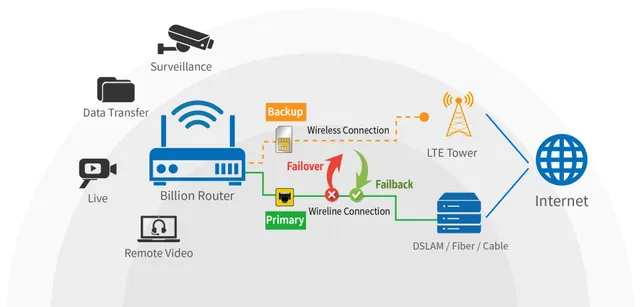
An internet backup solution is a secondary internet connection that automatically or manually activates when your main connection fails.
This ensures:
- No downtime
- Continuous work or business operations
- Better reliability
Backup solutions are widely used by businesses, but now even home users are adopting them.
Why You Need a Backup Internet Connection
1. Avoid Downtime
Even a few minutes of internet outage can disrupt meetings and work.
2. Business Continuity
For businesses, downtime can mean loss of revenue. Best Internet Backup Solutions
3. Remote Work Stability
Remote workers depend heavily on a stable internet.
4. Emergency Connectivity
Backup internet ensures you stay connected in emergencies.
Types of Internet Backup Solutions
Let’s explore the most popular backup options available in 2026.
1. Mobile Hotspot Backup (4G/5G)
A mobile hotspot is one of the easiest and most affordable backup solutions.
Pros:
- Portable and easy to use
- Works almost anywhere
- No installation required
Cons:
- Limited data plans
- Speed depends on network coverage. Best Internet Backup Solutions
Popular providers include:
- T-Mobile
- Verizon
2. Secondary Broadband Connection
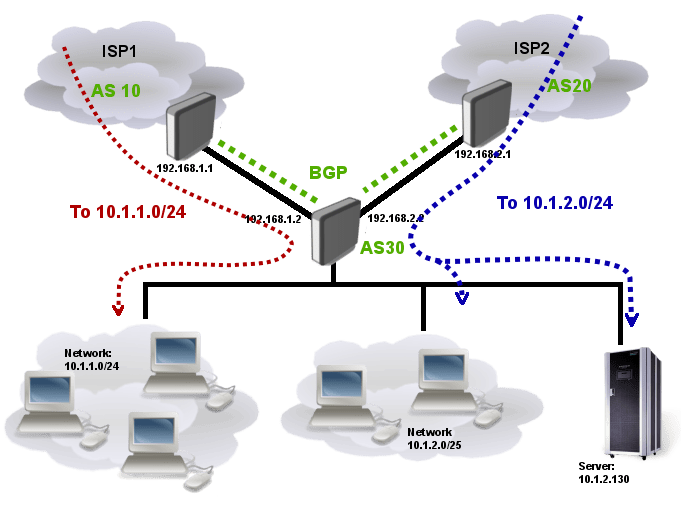
This involves installing a second internet connection from another ISP.
Pros:
- High reliability
- Fast speeds
- Ideal for businesses
Cons:
- Expensive
- Requires dual WAN router
Best for offices and heavy users.
3. Satellite Internet Backup
Satellite internet, like Starlink, can act as a powerful backup option.
Pros:
- Works in remote areas
- Independent of cable/fiber/ Best Internet Backup Solutions
Cons:
- Higher cost
- Weather sensitivity
4. Fixed Wireless Backup
Fixed wireless internet uses radio signals instead of cables.
Pros:
- Faster than DSL
- Good backup option
Cons:
- Limited availability
5. Automatic Failover Systems
Failover routers automatically switch to the backup internet when the main connection fails.
Benefits:
- Zero downtime
- Seamless switching. Best Internet Backup Solutions
- Ideal for businesses
Best Backup Solution for Home Users
For home users, the best options are:
- Mobile hotspot
- Secondary broadband (if budget allows)
These are simple, affordable, and effective.
Best Backup Solution for Businesses
Businesses should consider:
- Dual ISP connections
- Failover routers
- Dedicated backup lines
These ensure maximum uptime and reliability.
How to Set Up a Backup Internet System
Step 1: Choose Backup Type
Select based on your budget and needs. Best Internet Backup Solutions
Step 2: Get Required Equipment
You may need a dual WAN router or hotspot device.
Step 3: Configure Failover
Set up automatic switching (if supported).
Step 4: Test the System
Always test your backup connection. Best Internet Backup Solutions
Common Mistakes to Avoid
- Relying on one ISP only
- Not testing backup regularly
- Choosing slow backup connections
- Ignoring data limits
Related Articles
- How to Increase Internet Speed at Home
- Best Internet for Remote Work 2026
- Internet Speed Test Guide
- How to Fix Starlink Internet Issues – Complete Troubleshooting
FAQ Section
What is the best backup internet option?
Mobile hotspots and dual broadband connections are the most popular options.
Is backup internet necessary?
Yes, especially for businesses and remote workers.
Can Starlink be used as a backup?
Yes, Starlink is a great backup option in rural areas.
What is a failover internet?
It automatically switches to backup internet when the main connection fails.
Conclusion
In 2026, having a backup internet solution is no longer optional—it’s essential. Whether you’re a remote worker or running a business, staying connected at all times is critical.
By choosing the right backup solution, you can avoid downtime, improve productivity, and ensure a smooth online experience.
Advanced Pro Tips (SEO Boost Section)
Combine Two Different Technologies
Use fiber + 5G or cable + satellite for maximum reliability.
Monitor Your Network
Use apps and tools to track uptime and performance.
Upgrade Your Router
Invest in a dual WAN router for automatic failover.
Plan for Emergencies
Always keep a backup ready for unexpected outages.