Learn how to install Starlink internet at home in 2026 with this step-by-step guide. Easy setup, tips, and installation process explained.
Setting up high-speed satellite internet at home has never been easier. With Starlink, users can install their own internet system without needing complex wiring or professional technicians.
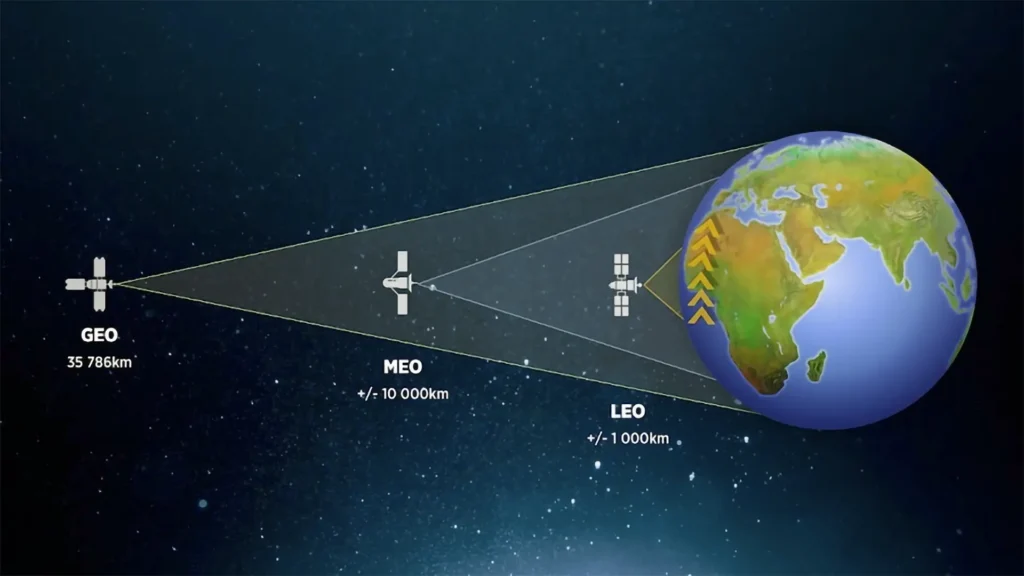
Developed by SpaceX, Starlink provides fast and reliable internet using satellites in low Earth orbit.
In this guide, you will learn how to install Starlink internet at home step-by-step, even if you have no technical experience. How to Install Starlink Internet
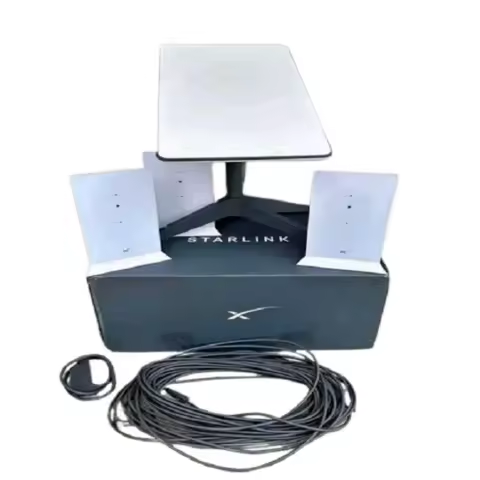
Before starting the installation, it is important to understand what you get in the Starlink kit.
The standard kit includes:
- Starlink satellite dish
- Wi-Fi router
- Power supply
- Mounting base
- Cables
What Comes in the Starlink Kit?
Before starting the installation, it is important to understand what you get in the Starlink kit.
The standard kit includes: How to Install Starlink Internet
- Starlink satellite dish
- Wi-Fi router
- Power supply
- Mounting base
- Cables
Everything you need for setup is included in the box.
Step 1: Choose the Best Installation Location
The most important part of the setup is selecting the right location.
Your Starlink dish must have a clear view of the sky with no obstructions like:
- Trees
- Buildings
- Walls
Use the Starlink mobile app to scan the sky and find the best spot for installation.
Step 2: Set Up the Starlink Dish
Once you find the ideal location:
- Place the dish on a flat surface or mount it on the roof
- Ensure it is stable and secure
- The dish will automatically adjust its position
Starlink dishes are designed to align with satellites automatically.
Step 3: Connect the Router and Power
Next, connect all the cables:
- Plug the dish cable into the router
- Connect the router to the power supply
- Turn on the system
After powering on, the system will begin connecting to the satellite network.
Step 4: Configure Using the App
Download the Starlink mobile app and follow the setup instructions.
The app will help you:
- Create a Wi-Fi network
- Set a password
- Monitor connection status
Within a few minutes, your internet connection should be ready.
Step 5: Test Your Internet Speed How to Install Starlink Internet
After installation, test your internet speed to ensure everything is working properly.
You can use tools like Speedtest by Ookla to check:
- Download speed
- Upload speed
- Latency
Tips for Better Performance
To get the best performance from Starlink, follow these tips:
- Install the dish at a higher location
- Avoid obstructions
- Keep cables secure and protected
- Restart the router occasionally
These small steps can improve speed and stability.
Common Installation Issues
Some users may face minor issues during setup.
1. No Signal
- Check for obstructions
- Reposition the dish
2. Slow Speed
- Wait for full satellite connection
- Check network congestion
3. App Not Connecting
- Restart the router
- Reinstall the app
Most problems are easy to fix and do not require professional help.
FAQ Section
How long does it take to install Starlink? How to Install Starlink Internet
Starlink installation usually takes 15–30 minutes.
Do I need a technician to install Starlink?
No, Starlink is designed for self-installation, and most users can set it up
Where should I place the Starlink dish?
The dish should be placed in an open area with a clear view of the sky.
Can I install Starlink on my roof? How to Install Starlink Internet
Yes, roof installation is recommended for better signal and performance.
Conclusion
Installing Starlink internet at home is simple and user-friendly. With just a few steps, you can enjoy high-speed satellite internet without complicated wiring. How to Install Starlink Internet
Thanks to Starlink, even users in remote areas can now access fast and reliable internet.
Related Articles
You can also read:
- Starlink Internet Price in USA 2026 – Full Cost & Review
- Starlink for Gaming – Is It Good for Online Games
- Starlink vs Fiber Internet – Which Internet Is Better
- Starlink for Gaming – Is It Good for Online Games in 2026?
These posts will help you understand Starlink performance and pricing.