Learn how to get internet without cable or a phone line in 2026. Discover wireless, 5G, satellite, and mobile hotspot options for fast and reliable connectivity.
Introduction
In 2026, you no longer need traditional cable or phone lines to access the internet.
Thanks to modern technology, there are several wireless and flexible internet options available that work almost anywhere.
Whether you live in a rural area, travel frequently, or want to avoid expensive cable contracts, this guide will show you how to get internet without cable or a phone line.
Why Choose Internet Without Cable?
There are several benefits:
- No installation of wires
- Flexible and portable
- Often cheaper than cable
- Quick setup
This makes it ideal for modern users.
1. Mobile Hotspot (4G/5G Internet)
A mobile hotspot is one of the easiest ways to get internet. How to Get Internet Without Cable
How It Works:
- Uses cellular network
- Connects devices via WiFi
Pros:
- Portable
- Easy to use
- No installation
Cons:
- Limited data
- Speed depends on the signal
Popular providers include:
- T-Mobile
- Verizon
2. 5G Home Internet
5G home internet is becoming very popular in 2026.
Features:
- High-speed internet
- No cables required
- Simple plug-and-play setup
Best For:
Urban and suburban areas with strong 5G coverage.
3. Satellite Internet
Satellite internet works almost anywhere. How to Get Internet Without Cable
A leading provider is Starlink.
Pros:
- Global coverage
- Ideal for remote areas
Cons:
- Higher cost
- Weather impact
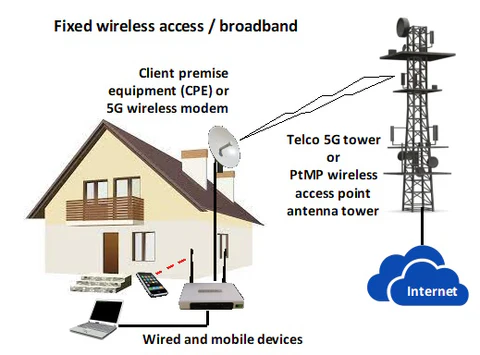
4. Fixed Wireless Internet
Fixed wireless uses signals from nearby towers.
Pros:
- Faster than DSL
- No cables needed
Cons:
- Limited availability
5. Public WiFi & Community Networks
You can also use public WiFi in:
- Cafes
- Libraries
- Co-working spaces
Warning:
Always use secure connections when using public WiFi.
Speed Comparison
| Option | Speed | Best For |
|---|---|---|
| Mobile Hotspot | Medium | Travel |
| 5G Internet | High | Home use |
| Satellite | Medium | Rural areas |
| Fixed Wireless | High | Suburban areas |
Cost Comparison (2026)
| Type | Monthly Cost |
|---|---|
| Mobile Hotspot | $30–$80 |
| 5G Internet | $50–$100 |
| Satellite | $100–$150 |
| Fixed Wireless | $40–$90 |
Best Option for Different Users. How to Get Internet Without Cable
Students
Mobile hotspot or shared WiFi
Remote Workers
5G or fixed wireless
Rural Users
Satellite internet (like Starlink)
Common Mistakes to Avoid
- Choosing plans without checking coverage
- Ignoring data limits
- Using insecure public WiFi
- Paying for unnecessary speed
FAQ Section
Can I get internet without a phone line?
Yes, many wireless options are available.
What is the best wireless internet option?
5G internet is the best in urban areas.
Is satellite internet reliable?
Yes, especially in remote areas.
Is a mobile hotspot enough for home use?
For light usage, yes.
Conclusion
Getting internet without cable or a phone line is easier than ever in 2026. With options like 5G, satellite, and wireless internet, you can stay connected anywhere.
Choosing the right option depends on your location, budget, and usage needs.
Advanced Tips (SEO Boost Section)
Check Coverage First
Always confirm availability before choosing a provider.
Combine Options
Use a mobile hotspot as a backup.
Secure Your Connection
Use strong passwords and encryption.
Optimize Usage
Limit unnecessary data usage.
Advanced Student Internet Optimization Tips
Use a VPN for Secure Browsing
Using a reliable VPN helps protect your data on public or shared student networks. It also ensures privacy while accessing academic resources online.
Optimize Router Placement
Place your router in a central location to get better coverage. Avoid walls and metal objects to improve signal strength in dorms or apartments.
Schedule Heavy Downloads
Download large files or updates during off-peak hours to avoid slow speeds during study or class time.
Upgrade Only When Necessary.
Don’t upgrade your plan unless your current speed is consistently affecting performance. Smart upgrades save money.
Use Ethernet for Stability
For important tasks like exams or video calls, use a wired Ethernet connection for maximum stability.
Limit Background Usage
Close unnecessary apps and devices using the internet to ensure better speed for your main tasks.
Related Articles
- Best Internet Plans for Students
- Fixed Wireless vs Satellite Internet
- How to Reduce Internet Bill
- Best Internet Plans for Students (USA & UK Guide 2026)